SAP Tables
Environment | Structural | Organizational
Table | Description | Type | Area | T-Code | Key Field1 | Key Field 2 | Key Field 3 | Key Field 4 | Add Field | Explanation |
|---|---|---|---|---|---|---|---|---|---|---|
SKA1 | G/L Account Master (Chart of Accounts) | Master Data | Accounting | FS00 | SAKNR | KTOPL | ||||
SKAT | G/L Account Master Record (Chart of Accounts: Description) | Master Data | Accounting | FS00 | SAKNR | KTOPL | SPRAS | |||
SKB1 | G/L account master (company code) | Master Data | Accounting | FS00 | SAKNR | BUKRS | ||||
ACDOCA | Universal Journal Entry Line Items | Transactional | Accounting | FB01 | BELNR | RBUKRS | GJAHR | RLDNR | S/4 HANA Universal Journal (Single Source of Truth). All Financial and Management Accounting Postings | |
ACDOCP | Plan Data Line Items | Transactional | Accounting | REQTSN | DATAPAKID | RECORD | RACCT | S/4 HANA Universal Journal for Plan Data Line Items | ||
BKPF | Accounting Document Header | Transactional | Accounting | FB01 | BELNR | BUKRS | GJAHR | |||
BSEG | Accounting Document Segment | Transactional | Accounting | FB01 | BELNR | BUKRS | GJAHR | |||
REGUS | Accounts blocked by Payment proposal | Transactional | Accounts Payable | F110 | BUKRS | KOART | LAUFI | LAUFD | Find payment proposals that are blocking payment runs | |
CSKS | Cost Center Master Record | Master Data | Cost Center | KS01 | KOSTL | KOKRS | DATBI | |||
CSKT | Cost Center Texts | Master Data | Cost Center | KS01 | KOSTL | KOKRS | DATBI | SPRAS | ||
COBK | CO Object: Document Header | Transactional | Cost Center | |||||||
COEP | CO Object: Line Items (by Period) | Transactional | Cost Center |
SAP S/4 HANA ACDOCA and Elements
Field | Data Element | Short Description | Check Table | Domain | Data Type | Length | Decimal Places | Search Help | Origin of Input Help |
|---|---|---|---|---|---|---|---|---|---|
RCLNT | MANDT | Client | T000 | MANDT | CLNT | 3 | 0 | H_T000 | Input help implemented with check table |
RLDNR | FINS_LEDGER | Ledger in General Ledger Accounting | FINSC_LEDGER | FINS_LEDGER | CHAR | 2 | 0 | Input help implemented with check table | |
RBUKRS | BUKRS | Company Code | T001 | BUKRS | CHAR | 4 | 0 | C_T001 | Input help implemented with check table |
GJAHR | GJAHR | Fiscal Year | GJAHR | NUMC | 4 | 0 | |||
BELNR | BELNR_D | Accounting Document Number | BELNR | CHAR | 10 | 0 | |||
DOCLN | DOCLN6 | Six-Character Posting Item for Ledger | DOCLN6 | CHAR | 6 | 0 | |||
RYEAR | GJAHR_POS | General Ledger Fiscal Year | GJAHR | NUMC | 4 | 0 | |||
DOCNR_LD | FINS_DOCNR_LD | Ledger specific Accounting Document Number | BELNR | CHAR | 10 | 0 | |||
RRCTY | RRCTY | Record Type | RRCTY | CHAR | 1 | 0 | Input help with fixed values | ||
.INCLUDE | ACDOC_SI_00 | Universal Journal Entry: Transaction, Currencies, Units | STRU | 0 | 0 | ||||
RMVCT | RMVCT | Transaction type | T856 | RMVCT | CHAR | 3 | 0 | H_T856 | Input help implemented with check table |
VORGN | VORGN | Transaction Type for General Ledger | VORGN | CHAR | 4 | 0 |
Reference Transaction | Object Type Name | Structure | Remote | Function |
|---|---|---|---|---|
/OPT/ | Accounting document | |||
ABR | FS-RI Sett. Document | |||
ACE | Accrual Engine | ACEPS_AWKY | ACEPS_DOCUMENT_SENDER | |
ACES4 | Accrual Engine | BKPF_AWOBJ | FI_DOCUMENT_SENDER | |
AFRU | Reporting document | COBK_AWOBJ | AC_DOCUMENT_AFRU_DISPLAY | |
AIBU | Assts und.const.set. | BKPF_AWOBJ | AMFI_SHOW_AM_DOCUMENT | |
AMBU | Asset Transaction | BKPF_AWOBJ | AMFI_SHOW_AM_DOCUMENT | |
AMDP | Depreciation posting | BKPF_AWOBJ | AC_DOCUMENT_RECORD | |
ANLA | Asset Transaction | |||
AS91 | FIAA old assets data | |||
AUAK | Settlement document | K_SETTLEMENT_DOC_DISPLAY | ||
AXBTA | Bus. Travel Account |
Business Transaction Type | Text |
|---|---|
ABAK | Last retirement on Group Asset |
ABAW | New Revaluation |
ABGA | Asset Retirement |
ACEA | ACE Accruals Postings |
ACPA | One Allocation Plan Assess. |
ACPD | One Allocation Plan Distrib. |
AFAB | Legacy data transfer: pst. val |
ANZA | Down Payment |
AS91 | Legacy data transfer: cum. val |
AUAB | Retirement of Inv. Meas. AuC |
AUFW | Revaluation |
AUUA | AuC: Transf. Retirem. to Asset |
SAP Tables Relationship | Material Master Record
Material Master Record
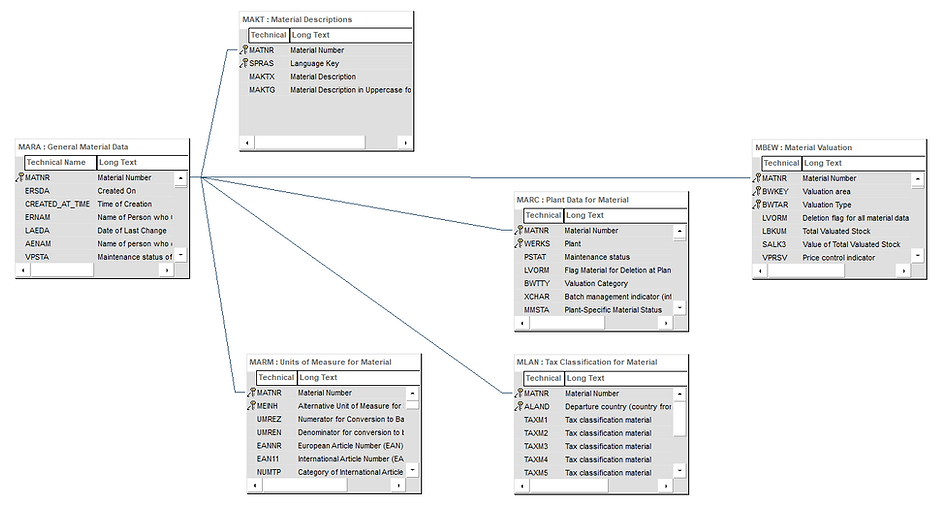
Table Category
The table category defines whether a physical table exists for the logical table description defined in the ABAP Dictionary and how the table is stored on the database.
Transparent Tables (TRANSP)
There is a physical table on the database for each transparent table. The names of the physical table and the logical table definition in the ABAP/4 Dictionary agree. All the business and application data is stored in transparent tables.
Structure (INTTAB)
No data records exist on the database for a structure. Structures are used for the interface definition between programs or between screens and programs.
Append Structure (APPEND)
An Append structure defines a subset of fields which belong to another table or structure but which are treated as a separate object in the correction management. Append structures are used to support modifications.
Pooled table
Pooled tables can be used to store control data (e.g. screen sequences, program parameters or temporary data). Several pooled tables can be combined to form a table pool. The table pool corresponds to a physical table on the database in which all the records of the allocated pooled tables are stored.
Cluster table
Cluster tables contain continuous text, for example documentation. Several cluster tables can be combined to form a table cluster. Several logical lines of different tables are combined to form a physical record in this table category. This permits object-by-object storage or object-by-object access. In order to combine tables in clusters, at least part of the keys must agree. Several cluster tables are stored in one corresponding table on the database.
Generated view structure (VIEW)
A structure is generated for a view during activation. This structure is used as the interface for the runtime environment. It is not usually displayed in the ABAP Dictionary.
Internal Table
Internal tables are dynamic data objects containing any number of rows with a common row type. Internal tables are particularly well suited for editing mass data in business applications. As well as the row type, the data type of an internal table is also defined by its table category and a table key.
Row Type
The row type can be a non-generic data type from ABAP Dictionary or global class or interface, a non-generic type in the local program, or a predefined ABAP type. Any types can be used as row types, such as elementary types, structured types, table types, and reference types.
Table Category
The table category defines how individual rows can be accessed:
-
Standard tables: They are managed using a row index. New rows can either be appended to end of the table or inserted at specific positions. Individual rows are accessed using the table key or the row index.
-
Sorted tables: They are also managed using a row index, but are sorted by the table key in ascending order. New rows can be inserted or appended only if they are sorted. The rows are accessed in the same way as in standard tables.
-
Hashed tables: They are managed using a hash algorithm. The rows are accessed using the table key only. Index operations are not possible.
Generic Table Categories
Two other generic table categories exist that can be used when typing formal parameters and field symbols.
-
Any Table: covers all table categories
-
Index Table: only covers those where index operations are possible (namely standard tables and sorted tables)
Table Key
Internal tables have a primary table key and can also have secondary table keys. If the row types are structured, the table key can consist of a list of structure components. Alternatively, the pseudo component table_line can be used to specify the entire table row as a key. Another option is to specify the standard key DEFAULT KEY. This key contains all components that are not numeric and are not themselves table types. The primary table key of a standard table can also be empty. Table keys in standard keys are always non-unique, which means multiple rows in the same table can have the same key. Hashed tables, on the other hand, always have a unique key. In sorted tables, this property can be defined using the additions UNIQUE and NON-UNIQUE.
Editing Internal Tables
Internal tables can be edited, for example, using the statements:
-
READ TABLE
-
LOOP AT
-
INSERT INTO TABLE
-
MODIFY TABLE
-
DELETE TABLE
Example
-
Declares an internal table itab with a structured row type
-
Fills the table by inserting rows
-
Reads the rows sequentially in a loop / Assigns the fifth row to a field symbol declared inline
* 1 Declare an internal table
* ---
DATA: BEGIN OF struc,
col1 TYPE i,
col2 TYPE i,
END OF struc,
itab LIKE STANDARD TABLE OF struc.
* 2 Inserting rows
* ---
DO 10 TIMES.
struc-col1 = sy-index.
struc-col2 = sy-index ** 2.
INSERT struc INTO TABLE itab.
ENDDO.
* 3 Reads in a loop
* ---
LOOP AT itab INTO struc.
WRITE: / struc-col1, struc-col2.
ENDLOOP.
READ TABLE itab INDEX 5 ASSIGNING FIELD-SYMBOL(<line>).
WRITE: / <line>-col1, <line>-col2.
References: SAP (www.sap.com); SAP Support (support.sap.com); SAP Help (help.sap.com); SAP Blog (blogs.sap.com)